The maximum leverage available on Exness is 1:Unlimited; however, to use unlimited leverage, your account must meet certain conditions, such as having an available margin of less than $5,000. Therefore, accounts that do not meet these conditions cannot use unlimited leverage and are limited to a maximum of 2,000x.
In addition, as the available margin in your account increases, the leverage automatically decreases to 1,000x or 500x.
| Available Margin (USD) | Maximum Leverage |
|---|---|
| 0〜4,999.99 | Unlimited (if conditions are met)/2,000x (standard) |
| 5,000〜29,999.99 | 2,000 times |
| 30,000〜99,999.99 | 1,000 times |
| 100,000 or more | 500 times |
This leverage limit applies to all account types: Standard, Standard Cent, Pro, Low Spread, and Zero.
Conditions for Switching to Unlimited Leverage on Exness (Unlimited Leverage)
| Conditions | Contents |
|---|---|
| Available Margin | The available margin in the trading account is less than $5,000 ($4,999.99 or less) |
| Transaction History | You must have settled a total of at least 5 lots (500 cent lots or more) across at least 10 orders (excluding limit orders) in all live trading accounts within your Personal Area. |
In a live trading account, once you’ve met the trading volume and order count requirements, “Unlimited” will appear in the section where you can change your leverage settings. While you can select “Unlimited” leverage at any time in a demo account, it is only actually applied when your available margin is less than $5,000. Instructions on how to switch to unlimited leverage are provided toward the bottom of this article.
Trading Instruments That Offer Unlimited Leverage
- Foreign Exchange: All major currency pairs and minor (cross) currency pairs
- Precious Metals: Gold (XAU) and Silver (XAG) Pair
Stocks with Expanding Unlimited Leverage (Schedule of Changes)
For the following securities, the required margin will change from a fixed amount to a dynamic amount, and the leverage set for your account (including unlimited leverage) will apply.
| Classification | Stock | Before the change | After the change | Date of Change |
|---|---|---|---|---|
| Precious Metals | XNIUSD | 50 times | Unlimited | October 17, 2026 |
| Precious Metals | XCUUSD, XALUSD, XPBUSD, XZNUSD, XPDUSD, XPTUSD | 100 times | Unlimited | October 17, 2026 |
| Energy | XNGUSD | 20 times | Unlimited | October 17, 2026 |
| Energy | UKOIL | 200 times | Unlimited | October 17, 2026 |
| Energy | USOIL | 2,000 times | Unlimited | October 17, 2026 |
| Index | US30, US500, USTEC, JP225, US30_x10, US500_x100, USTEC_x100 | 400 times | Unlimited | October 24, 2026 |
If the leverage for your account is set lower than the price of the security in question, the account settings will take precedence.
Exness Leverage Limits
Leverage Limits Based on Available Margin
The maximum leverage is determined by the available margin in your trading account; as shown in the table at the beginning, the available leverage decreases at the thresholds of $5,000, $30,000, and $100,000. If your available margin reaches $5,000 or more, the system is designed so that even if you have set the leverage to “unlimited,” the actual leverage will automatically be reduced to within the predetermined range.
Leverage Limits by Security
For some securities, a fixed margin requirement applies, meaning a set margin amount is required regardless of the account's leverage (including unlimited leverage).
| Stock | Leverage |
|---|---|
| Exotic Currency Pairs | Fixed Required Margin (Regardless of Leverage) |
| XAU/XAG pairs | Linked to the account's leverage (unlimited if conditions are met) |
| XCUUSD, XALUSD, XPBUSD, XZNUSD, XPDUSD, XPTUSD | Fixed at 100x (subject to change) |
| XNIUSD | Fixed at 50x (subject to change) |
| UKOIL | Fixed at 200x (subject to change) |
| XNGUSD | Fixed at 20x (subject to change) |
Exness Leverage Restriction Periods (Economic Indicators, Weekends, and Daily Market Closures)
During the period when the required margin (HMR) is raised, leverage restrictions will be in effect, and the maximum leverage will be lowered for each security.
| Timing | Time Required for HMR |
|---|---|
| High-Impact Economic Indicators and News | Orders placed between 15 minutes before and 90 seconds after the announcement (for most securities) |
| Closed on the Weekend | From approximately 3 hours before the market closes until 1 hour after it reopens (all securities except BTC and ETH) |
| Daily Market Closures: Gold and Silver | From 30 minutes before the end until about 10 minutes after the start |
| Daily Market Closures: USOIL, UKOIL | From approximately 30 minutes before the end until 5 minutes after the start |
| Daily Market Closures: US500, US30, USTEC | From approximately 3 hours before the end until 10 minutes after the start |
| Daily Market Closures: JP225 | From approximately 1 hour and 30 minutes before the end until 1 hour and 40 minutes after the start |
| Daily Market Closures: Stocks | From 20 minutes before the end until 15 minutes after the start |
| Holidays | Before and After Market Closures |
| Stock | Leverage During HMR |
|---|---|
| Foreign Exchange (All) | 200 times |
| Silver (XAG) | 50 to 200 times |
| USOIL・UKOIL | 20 times |
| XNGUSD | 5 times |
| US30, USTEC, US500 | 50 to 100 times |
| Other Indexes | 20 to 50 times |
| Stocks | 5 times |
| Cryptocurrency | 200 times |
Once the HMR period ends, the required margin is automatically recalculated based on the account’s available margin and the set leverage. Depending on trading conditions and market risks, the HMR may not apply, or the required margin may temporarily increase further.
How to Check Exness's Leverage Limits Today
- In the Exness Terminal, instruments subject to HMR are marked with a red three-line symbol. Clicking the symbol displays HMR details.
- In the Exness Terminal settings, you can display HMR time zones and the economic calendar on the chart. The economic calendar is organized by country and impact level.
- HMR indicators are also displayed on the charts in the Exness trading app. You can check the latest HMR time for each instrument in the trading app.
- Stocks subject to an HMR outside of trading hours are marked with a gray "prohibited" symbol. Hover your cursor over the symbol to see the time when trading will resume.
Exness's Zero Cut and Stop-Out
Exness's Zero Cut (Negative Balance Protection)
If a stop-out causes your trading account balance to go negative, the balance will be reset to 0. You will not incur losses exceeding the amount you deposited. The reset to 0 (displayed as “D-null” in the trading history) occurs automatically when all orders in the account are closed due to a stop-out and the balance is negative. Although the balance typically returns to zero relatively quickly, if you deposit funds via a transfer or other method before it reaches zero, the negative balance may be absorbed by the deposit amount and lost. Therefore, you should either wait until the balance returns to zero or trade using a new trading account.
Exness's Stop-Out Level (0% Stop-Out)
| Account Type | Margin Call | Stop-out |
|---|---|---|
| Standard, Standard Cent | 60% | 0% |
| Pro Low Spread Zero | 30% | 0% |
A stop-out occurs when the margin maintenance ratio reaches 0%, at which point all open positions—including hedged positions—are automatically closed. For Standard, Pro, Low Spread, and Zero accounts, the stop-out level changes to 100% during daily stock market closures.
Stop-Out Protection
This feature delays—and in some cases prevents—a stop-out. Its availability depends on trading conditions and trading activity, and it may not be available for accounts set to unlimited leverage.
Maximum lot size on Exness
| Account Type and Securities | Daytime (7:00 a.m. to 8:59 p.m. GMT+0) | Nighttime (9:00 PM–6:59 AM GMT+0) |
|---|---|---|
| Standard, Pro, Low Spread, Zero | 200 lots | 60 lots |
| Standard Cent | 200 lots | 200 lots |
| XAUUSD | 200 lots | |
| BTCUSD | 200 lots | |
| USOIL | 50 lots | 20 lots |
The minimum trade size is 0.01 lot for all account types. Since the maximum trade size varies by instrument, please check the instrument specifications before trading. The conditions for each instrument are also listed under the Exness account types.
Steps to Check and Change Leverage on Exness
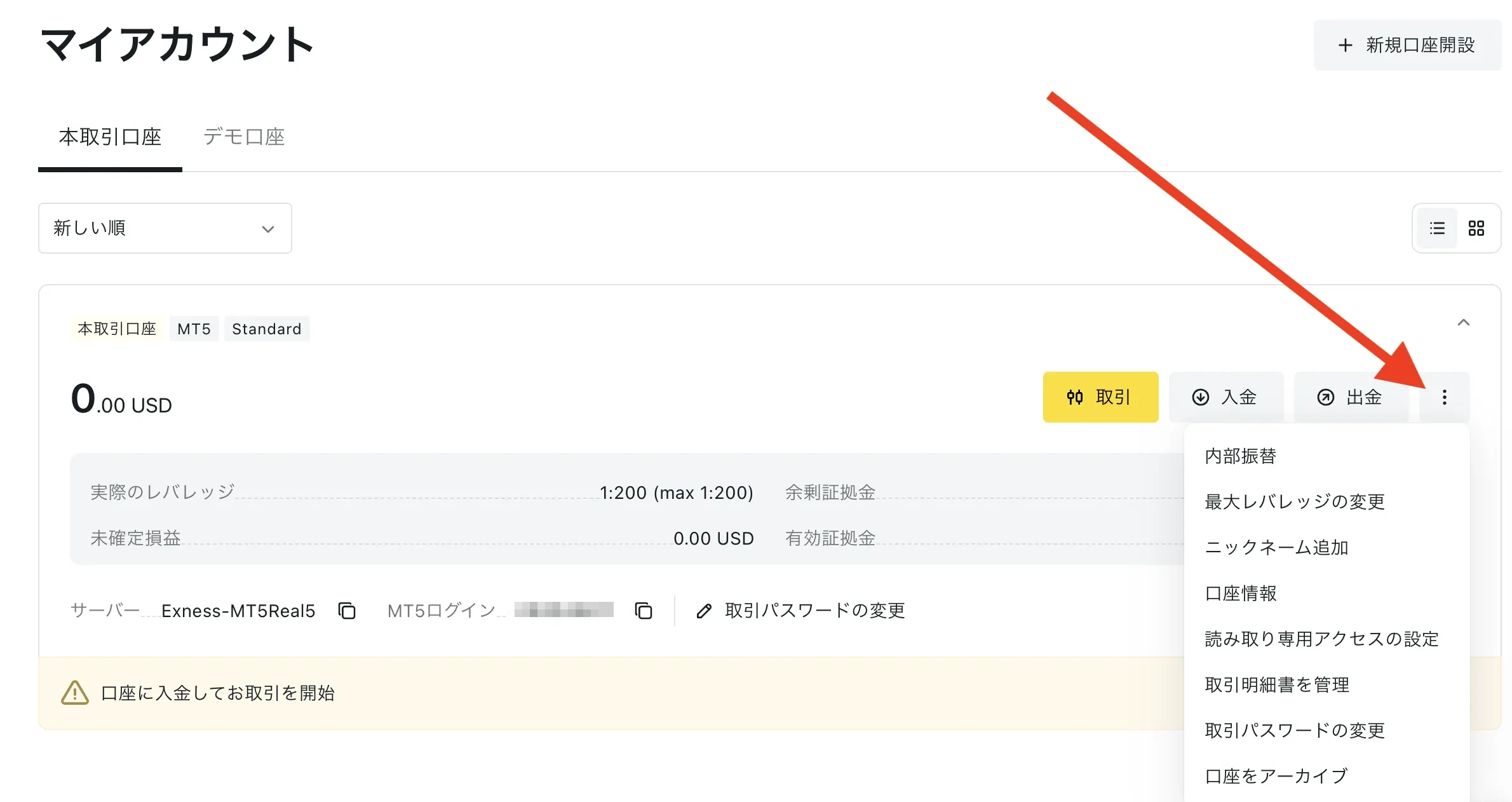
STEP 1: Log in to your user profile page and click the three-dot icon next to your trading account.
STEP 2: Select “Adjust Leverage”
STEP 3: Select a ratio from 1:2 to 1:unlimited from the drop-down menu (you can also set any value using "Custom")
STEP 4: Click "Continue" to confirm.
You can check the leverage set for your account by opening the drop-down menu on your account card. Depending on your available margin and HMR, the actual leverage applied may be lower than the set value; you can check the actual value in your Personal Area.
FAQ
Will Exness's leverage restrictions take effect sometime today?
On days when high-impact economic indicators are released, orders placed from 15 minutes before the release until 90 seconds after the release are subject to HMR. HMR periods also include the time immediately before and after daily market closures, as well as approximately 3 hours before the market closes on weekends and 1 hour after it reopens. You can check today’s eligible instruments using the red three-line symbol in the Exness Terminal and the economic calendar.
How can I check if I meet the requirements for unlimited leverage on Exness?
In your Personal Area, open "Adjust Leverage" for your trading account and check to see if "Unlimited" is displayed in the drop-down menu. This option will appear after you have closed 10 or more orders totaling 5 lots or more in this trading account.
Why can't I close my hedged positions during Exness's leverage restrictions?
During HMR, the required margin is increased, so if you close one side of a hedged position, the remaining order will be subject to a higher required margin. If you do not have sufficient free margin, you will not be able to close the position. For example, if you have a $100 account and open a hedged position with a 1:2000 leverage ratio, and the leverage ratio drops to 1:200, you will need $550 in margin.
Is it okay to make an additional deposit after Exness's zero-cut policy takes effect?
Please make a deposit only after your negative balance has automatically been reset to zero. If you make a deposit before the balance is reset to zero, the negative amount may be deducted. If you want to start trading immediately, please open a new trading account.
What happens if I change my leverage on Exness partway through?
You can change your leverage at any time, and the required margin is calculated based on the leverage you set. The lower the leverage, the higher the required margin, and the smaller the position you can hold with the same amount of capital.
For details on the rebate amount and eligibility requirements, please see the Exness Cashback page.