You can deposit funds into HFM via bank transfer, credit/debit card, bitwallet, BXONE, cryptocurrency, Binance Pay, and PESKA e-Wallet. Please note that HFM does not charge any deposit fees.
| Payment Methods | Minimum Deposit Amount | Upper Limit | HFM Fees | Processing Time |
|---|---|---|---|---|
| Bank Transfer | Equivalent to 1,000 yen or 10 dollars | Equivalent to 2.5 million yen or $25,000 | Free | — |
| Credit Cards (VISA, Mastercard) | Equivalent to $10 | worth $10,000 | Free | Within 10 minutes |
| Credit Card (JCB) | Equivalent to $5 | worth $20,000 | Free | Within 10 minutes |
| bitwallet | 1,000 yen | — | Free | Within 10 minutes |
| BXONE | 1,000 yen | $30,000 | Free | Within 10 minutes |
| Cryptocurrency (Crypto Payments Option A) | Worth $30 | worth $30,000 | Free | Immediately |
| Cryptocurrency (Crypto Payments Option B) | Equivalent to $15 | worth $30,000 | Free | Immediately |
| Binance Pay | Worth $20 | worth $20,000 | Free | Immediately |
| PESKA e-Wallet | — | — | Free | Within 10 minutes |
You are responsible for any bank transfer fees charged by the sending bank. The deposit limit may vary slightly depending on the exchange rate; you can check the current limits by referring to the “Minimum” and “Maximum” amounts displayed on the deposit screen.
HFM Minimum Deposit Amounts (by Account Type)
| Account Type | Minimum Initial Deposit |
|---|---|
| KATANA (Infinity X) Account | 80,000 yen, 500 dollars, 430 euros |
| Pro Account | 13,000 yen, 100 dollars, 100 euros |
| Premium Zero-Cent Top-Up Bonus Account | None (minimum amount applies only to each payment method) |
For KATANA (Infinity X) and Pro accounts, the minimum amount applies only to the initial deposit; there is no minimum amount for subsequent deposits. If you transfer an amount from your wallet that is less than the initial minimum, a message stating “The minimum transfer amount must be at least…” will appear, and while you will be able to view charts and other information in your account, you will not be able to buy or sell.
HFM Deposit Rules (Account Holder Name, Withdrawal Methods, Identity Verification)
| Rules | Contents |
|---|---|
| Name on the Account | Make deposits using the same name as the one registered with HFM. Deposits made in the name of a family member, company, or third party violate the terms of service. |
| Withdrawal Methods | Withdrawals up to the amount deposited must be made using the same method as the deposit. Withdrawals via credit card are limited to the amount deposited (and are treated as refunds). |
| Payment Recipient | In addition to the wallet (myHF Wallet), you can deposit funds directly into your MT4/MT5 trading account |
| Before Identity Verification | Deposits are limited to the equivalent of $2,000; deposits via JCB are not accepted. The restriction will be lifted after verification. |
| Processing Time | Deposits and withdrawals are processed from 7:00 a.m. Japan Time on Monday through 7:00 a.m. Japan Time on Saturday. |
You can check the name on your account in the "My Profile" section of the myHF area. To receive a deposit bonus, select the "Top-Up Bonus" account as your deposit destination (HFM Bonus).
HFM Deposit Methods and Procedures
Steps for Making a Bank Deposit (Bank Transfer) to HFM
STEP 1: Log in to the myHF area and open "Deposit" from the menu.
STEP 2: Select “Bank Transfer” → “Direct Online Banking,” enter the amount you wish to deposit, and click “Deposit.”
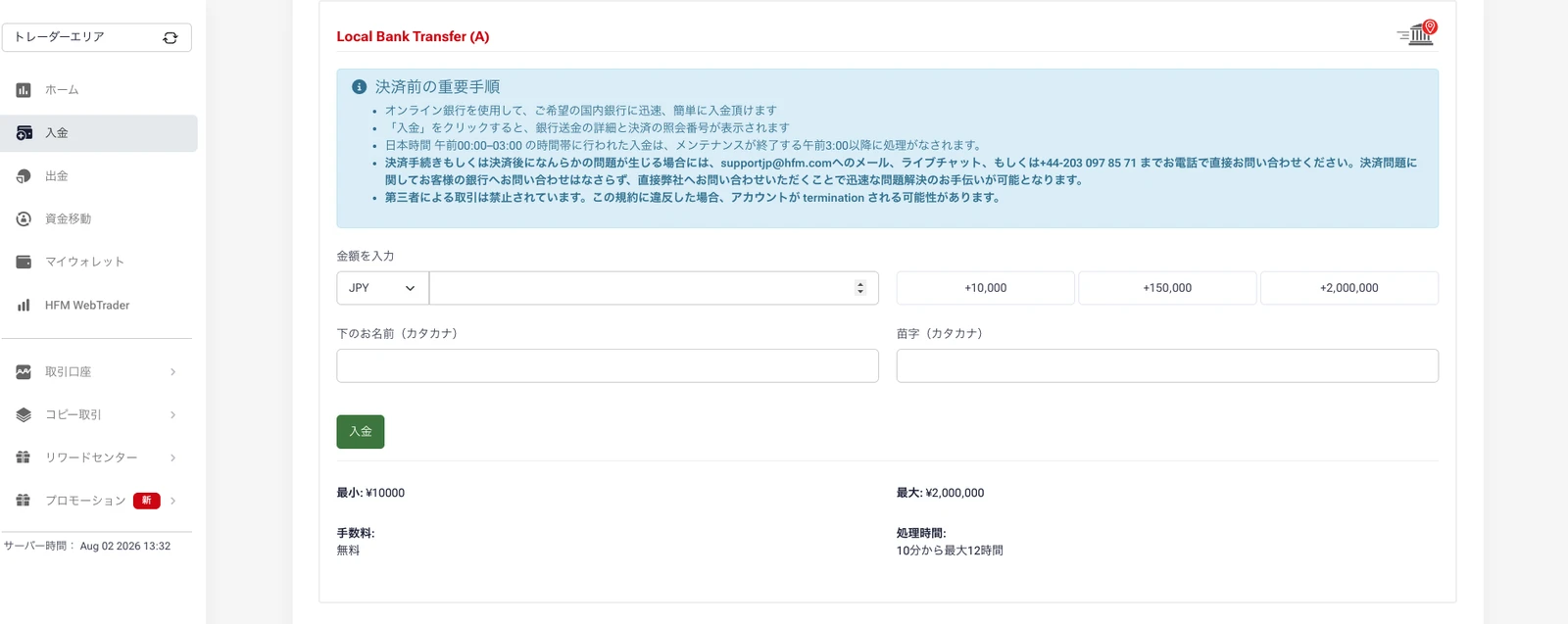
STEP 3: Transfer the exact amount you entered to the bank account displayed on the screen and in the email. The transaction is valid for 60 minutes.
The recipient bank may vary from transaction to transaction; please transfer funds to the account displayed each time a deposit is made. If the amount you enter differs from the amount transferred, the transaction will not be processed automatically and will require manual verification, resulting in a significant delay. Transactions that remain unprocessed for more than 60 minutes will be automatically canceled. If you select “Domestic Bank Transfer,” the transfer must be made in Japanese yen; amounts for accounts denominated in U.S. dollars or euros will be converted at the exchange rate in effect at that time.
Steps for Making a Credit Card Deposit with HFM
STEP 1: From the "Deposit" menu, select "Credit/Debit Card," then choose either VISA or JCB.
STEP 2: Enter the currency and deposit amount, then click "Deposit." You will receive an email once the transaction is complete.
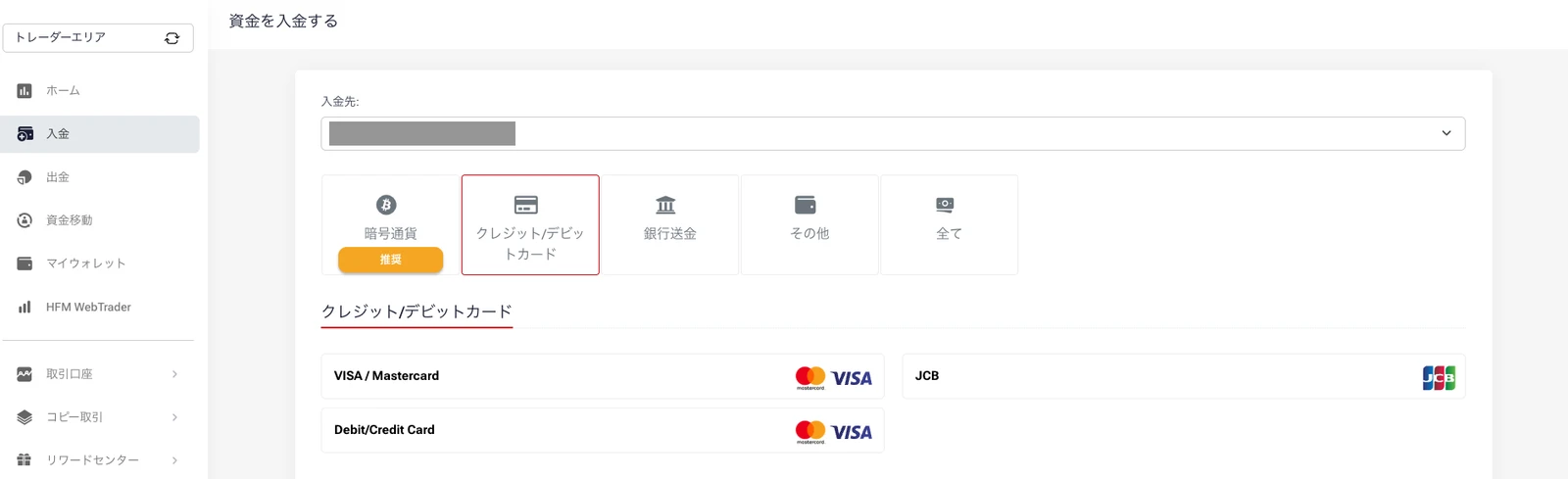
We accept VISA, Mastercard, and JCB; AMEX, Diners Club, and UnionPay are not accepted. Cards must be in the cardholder's name.
Steps for Depositing Cryptocurrency (Digital Currency) on HFM
STEP 1: From the "Deposit" menu, select "Cryptocurrency" → "Crypto Payments."
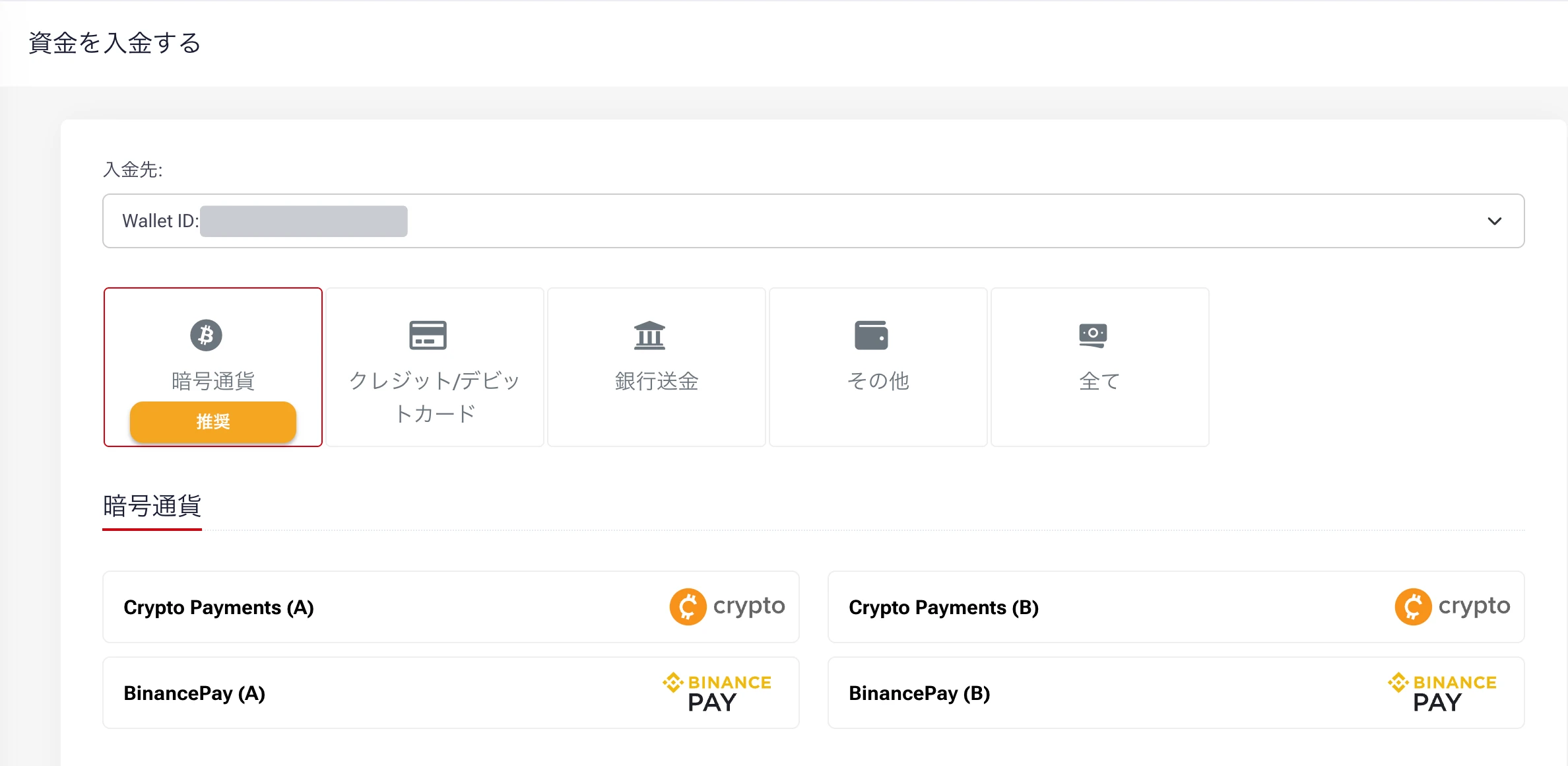
STEP 2: Enter the currency type and deposit amount (Option A: USD or EUR; Option B: USD only), then click "Deposit."
STEP 3: Use the displayed recipient address or QR code to send funds from your cryptocurrency wallet.
| Method | Accepted Currencies |
|---|---|
| Crypto Payments (Option A) | BTC, LTC, ETH, BCH, DASH, ZEC, ADA, USDC, USDT-ERC20, USDT-TRC20 |
| Crypto Payments (Option B) | BTC, LTC, ETH, USDT-ERC20, USDT-TRC20 |
| Binance Pay | USDT-TRC20 |
In Binance Pay, select “Cryptocurrency” → “Binance Pay,” enter the amount, and click “Deposit” to open the Binance Pay login screen. Click “Begin Payment” to send the funds.
Important Notes on Cryptocurrency Deposits at HFM
Amounts must be specified in fiat currency, not cryptocurrency. Since the recipient’s address may change each time, be sure to copy and use the recipient’s address directly each time—do not rely on lists or other sources. We do not support transfers using email addresses, phone numbers, or Binance IDs. Please note that you are responsible for any transfer fees charged by your wallet provider.
Deposits to HFM's bitwallet, BXONE, and PESKA e-Wallet
Select your wallet from the "Deposit" menu, enter the amount, and complete the transaction. The funds are typically credited within 10 minutes. bitwallet charges fees for card top-ups and bank transfers.
HFM Fund Transfers
A funds transfer refers to moving funds from a trading account to a wallet, from a wallet to a trading account, or between trading accounts. There are no fees, and transfers are processed immediately.
HFM Fund Transfer Procedure
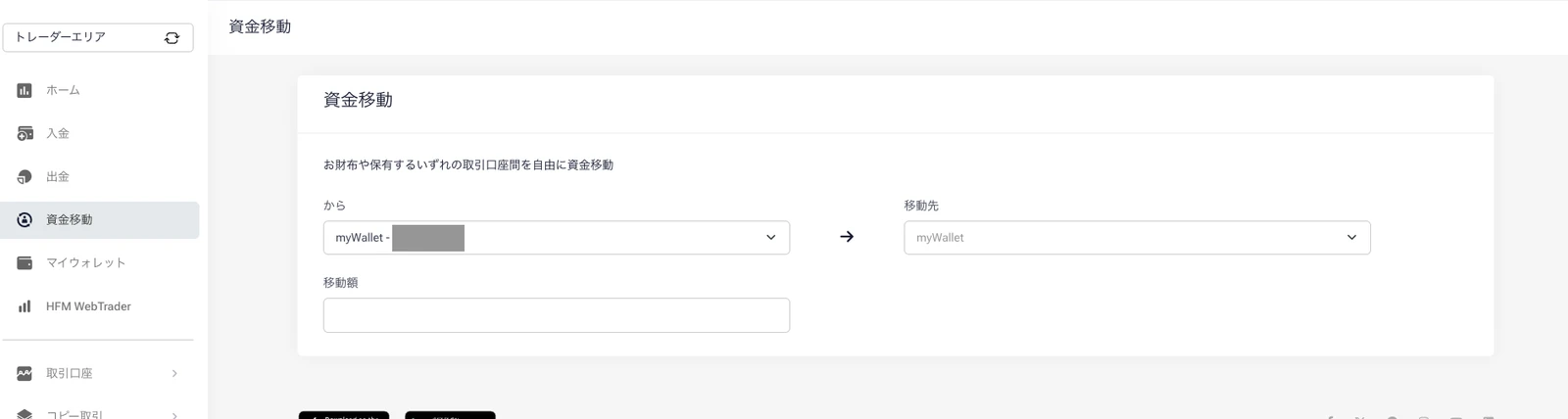
STEP 1: Open "Fund Transfers" from the menu on the left in the myHF area.
STEP 2: Select the source and destination accounts, enter the amount, and tap “Transfer Funds.” Once “Transfer Successful” appears, the process is complete.
When You Can't Transfer Funds via HFM
If there are open positions in the account from which funds are being transferred, you cannot make a transfer if doing so would cause the margin maintenance ratio in the receiving account to fall below 150% during weekday trading hours or below 300% on weekends. You also cannot transfer funds to an account under a different name, transfer the bonus itself, or transfer an amount exceeding the account balance. If you transfer cash from a Top-Up Bonus account, the bonus will be reduced in proportion to the amount transferred.
Reasons Why HFM Deposits May Not Be Reflected or Why You Can't Make a Deposit
| Cause | Response |
|---|---|
| The amount entered and the amount transferred differ in a bank transfer | Contact support and attach a screenshot of the email containing the bank account information. |
| The validity period (60 minutes) for the payee has expired | Repeat the payment process and transfer the funds to the new account. |
| You have not met the minimum deposit requirement | Proceed with an amount equal to or greater than the "Minimum" amount shown on the payment screen. |
| Incorrect Card Information, Expired Card, or Reached Credit Limit | Check Your Card Information and Credit Limit |
| Unsupported Card Brands and Usage Restrictions Imposed by Card Issuers | Use VISA, Mastercard, or JCB. Check with your card issuer for any restrictions. |
| Unable to complete authentication (e.g., 3D Secure) | Turn off your ad blocker and try the process again. |
| The cryptocurrency or amount differs from what was requested; incorrect address | Send the amount in the same currency as specified in the application to the address provided. |
| Processed on the weekend or outside of business hours | Wait for processing to begin after 7:00 a.m. Japan Standard Time on Monday |
When You Can't Make a Credit Card Deposit on HFM
Some credit card companies restrict deposits to overseas FX brokers, and HFM does not know whether deposits are permitted for each specific card. If you try multiple times, your card may be flagged for suspected fraudulent activity and become unusable, so please check with your credit card company first. Please note that you cannot make deposits with JCB until you have completed identity verification.
Frequently Asked Questions About HFM Deposits
Where can I check my HFM deposit history and the status of my deposits?
You can check the status of your deposit in the myHF area. If the status remains "Processing" for several hours without changing, please contact support. If it's urgent, live chat is the fastest option: メールはsupportjp@hfm.comです.
Can I make a deposit on HFM before completing identity verification?
Before identity verification is complete, you can deposit up to the equivalent of $2,000, but deposits via JCB are not allowed. Since withdrawals cannot be made until identity verification is complete, be sure to submit your documents as soon as possible.
Is the bank account for HFM bank transfers always the same?
It may not always be the same. You must transfer funds to the recipient account displayed each time you make a payment. Even if you open an account at the same bank as the recipient to save on transfer fees, that same bank may not be designated for your next payment.
Can I cancel a deposit to HFM?
If you’re paying by bank transfer and haven’t made the payment yet, you can contact us via live chat to cancel; the transaction will be automatically canceled after 60 minutes. If you’ve already made the payment and the transaction has been processed, cancellation is usually not possible. In that case, please confirm the deposit and then request a withdrawal. There is no fee for this withdrawal.
Is there a fee for depositing funds into HFM?
HFM does not charge any deposit fees. However, fees such as bank transfer fees, bitwallet top-up fees, and cryptocurrency wallet transfer fees are incurred outside of HFM and are the customer’s responsibility. For information on withdrawal methods and fees, please see the HFM Withdrawal page.
Please see HFM's Cashback page for details on the rebate amount and eligibility requirements.