If you open an HFM account through REBATE ONE, you’ll not only receive cashback on every trade but also qualify for a promotion that gives you 5,000 yen for trading 3 lots and 10,000 yen for trading 6 lots, making it a great deal.
This page provides instructions on how to open your first HFM Cashback Account (REBATE ONE-compatible account).
HFM allows only one account per person; an individual cannot hold multiple accounts.
If you already have an HFM account, you can create a cashback-eligible account by entering the REBATE ONE code when creating an additional account within your existing account.
If you already have an HFM account, click here
How HFM Accounts Work
HFM operates on a system where your registered email address serves as your account (wallet).
Within an account, you can create multiple sub-accounts based on their intended use for trading (such as currency pairs, scalping, or swing trading).
Since the system makes it easy to transfer funds from your wallet to the accounts you’ve created, you can allocate funds to each account as needed.
How to Open a New HFM Cashback Account
There is no need to send anything by mail to create an HFM account; the entire process is completed online.
You need an email address to create an account.
In addition, you will need one form of identification and one proof of address, as listed below.
Required Documents
Identification documents (valid)
- The page in the passport containing the photo
- My Number Card
- Front and Back of a Driver's License
Proof of address (issued within the past 6 months)
- Electricity Bill
- Gas Bill
- Phone Bill
Steps to Open a Cashback Account
First, click the link button below to open the HFM account opening page.
If the button doesn't work, you can also open an account through the HFM official website.
次に、画面右上にある緑色ボタン「登録」を押します。

Entering Personal Information
Enter your "Country of Residence," "Email Address," and "Password."

Consent to the Privacy Policy
After checking the box next to “I agree to the Privacy Policy,” click “Register.”
Enter the verification code
Once registration is complete, a "verification email" will be sent to the email address you provided, and the website will redirect you to a page where you can enter the verification code.

Open the email, enter the verification code displayed there, and complete the process.

Once your email verification is complete, you will be logged in.
Filling Out Your Profile
I'll start filling out my profile.
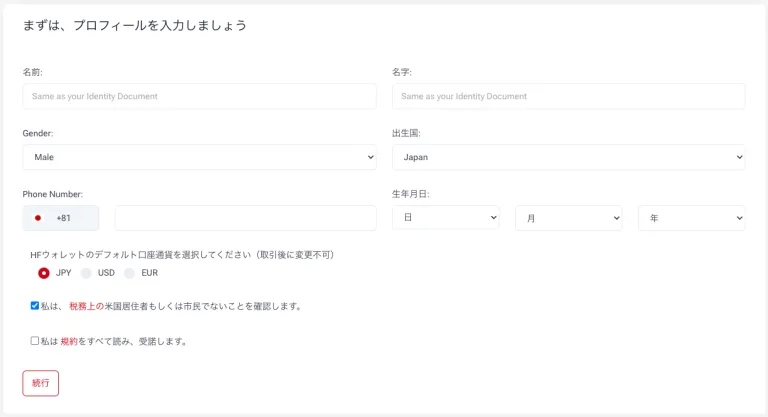
Enter your name, date of birth, and other information; select your account currency; review the terms and conditions; check the checkbox; and click “Continue.”
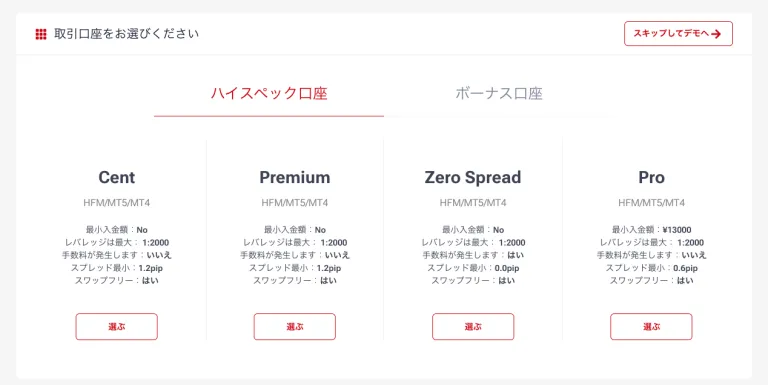
Selecting an Account Type
Select the account type you'd like to use and open the account.
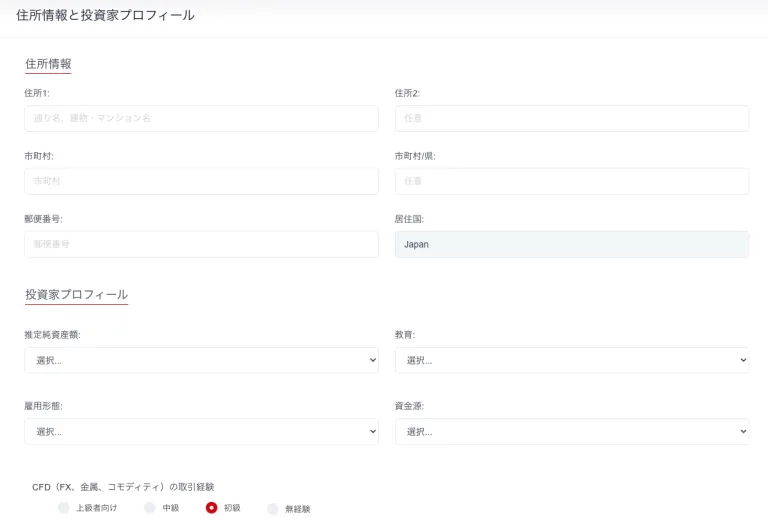
Next, click “Complete Registration” on the left to enter your “Investor Information and Profile,” “Trading Knowledge and Experience,” and “Declaration.”

We'll enter your address information and investor profile.
Uploading Required Documents
Once you have finished entering your personal information, upload the required documents. You will need two types of documents: proof of identity (PLE) and proof of address (POA). Follow the instructions to upload them.
Once the upload is complete, HFM will begin reviewing the documents.
That completes the process of opening a new HFM account.
Let's apply for an account so you can get your cashback!
Once you've created an account eligible for cashback, the next step is to apply for an account to receive the cashback.
If you do not submit this application, you will not be able to receive your cashback even if you have gone to the trouble of opening a cashback-eligible account, so please be sure to do so.
Final Step >> Request a Cashback Receiving Account