This page explains how to switch to a REBATE ONE account if you already have a Traders Trust (TTCM) account and would like to receive cashback from REBATE ONE.
If you would like to change the linked (partner) account for your current Traders Trust (TTCM) account, or if you would like to make it an account eligible for cashback, please refer to this page.
How Traders Trust (TTCM) Accounts Work
Traders Trust (TTCM) operates on a system where the registered email address serves as the account. Changes to the linked partner are made on a per-account basis.
There are two ways to change your affiliate (partner) account at Traders Trust (TTCM)
There are two ways to change your Traders Trust (TTCM) affiliate (partner) account:
Both are REBATE ONE cashback-eligible accounts, so you'll be able to receive cashback.
How to Change Your Account Linking Information Using Support Email or Chat
Changing your linked account (partner) via support email or chat is more convenient because it allows you to keep your current account status as-is, eliminating the need to re-verify your email address, phone number, or ID. You can transfer your existing funds as-is and resume trading seamlessly.
How to Create a New Account with a Different Email Address
You can easily open a cashback-eligible account by creating a new account with a new email address. For instructions on how to create a new account with a different email address, please see here.
How to Request a Link Change via Support Email or Chat
Connect to Support
After logging in to Traders Trust (TTCM), click the chat icon in the lower-right corner.

Once the chat begins, type "I'd like to change my partner," and
REBATE ONE Affiliate Link
https://secure-vu.traders-trust.com/register/?lang=jp&a_aid=1289513_123
I will convey this.
When submitting a request to Support via email
Send an email from the email address registered with Traders Trust (TTCM) to the support address below, including the necessary information.
Recipient
jsupport@ttcm.com
Email Content
【件名】 パートナー変更依頼
【本文】
・口座番号
・REBATE ONEのリンク→
https://secure-vu.traders-trust.com/register/?lang=jp&a_aid=1289513_123
Fill it out and send it.
Once you receive notification from Traders Trust (TTCM) that the affiliate assignment has been completed, the process is finished.
Opening an Additional Account
After completing the partner change with Traders Trust (TTCM), go to "Open an Additional Account" on your My Page. Click "+ Open a Live Account" at the top of the login page.
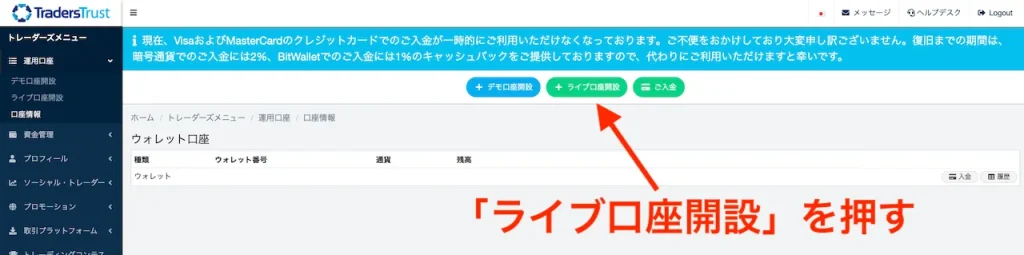
From the drop-down menu, select the Traders Trust (TTCM) cashback account type you want to create.

Select the leverage and currency you want to use, then click "Continue" to create the account.
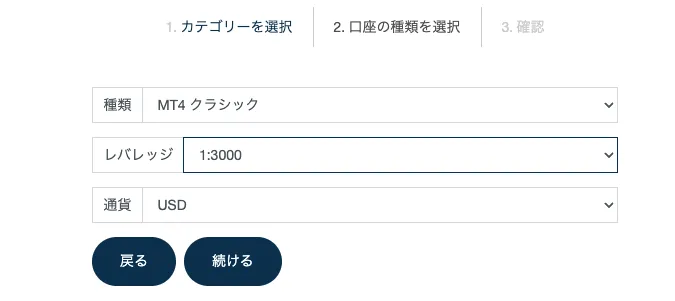
That completes the process of opening a cashback account with Traders Trust (TTCM).
Let's apply for an account so you can get your cashback!
Once you've created an account eligible for cashback, the next step is to apply for an account to receive the cashback.
If you do not submit this application, you will not be able to receive your cashback even if you’ve gone to the trouble of opening a cashback-eligible account, so please be sure to do so.
最後のステップ>>キャッシュバック受け取り口座申請