This page provides instructions on how to open your first REBATE ONE cashback-eligible account with Traders Trust (TTCM).
Opening an account with Traders Trust (TTCM) does not require any mail-in paperwork; the entire process is completed online.
To open an account, you will need an email address, a phone number, and the following identification documents.
Required Documents
Identification documents (valid)
You must present a valid, government-issued photo ID.
* Passport
* My Number Card
* Driver's License
Proof of address (issued within the past 6 months)
* Utility bills (electricity, gas, water, internet, landline phone, etc.)
* Bank and credit card statements
* Certificate of Residence and seal registration documents
Opening a Traders Trust (TTCM) Cashback Account
Click the link button below to the official Traders Trust (TTCM) website to open the Traders Trust (TTCM) account opening page.
If the button doesn't work, you can also open an account through the official Traders Trust (TTCM) website.
Entering Information
On the first page, titled “Sign Up Now!”, you’ll enter personal information such as your name, email address, nationality, and cell phone number.
If you agree to the Privacy Policy and customer agreement, check the box and click "Sign Up."

When you click "Sign Up," a PIN code will be sent to the email address you entered earlier as part of the "PIN Verification" process, so please enter it.


Once you enter your PIN, you'll receive an email at the address you used to log in, containing your email address and password.
Click "Go to My Account" at the bottom of the email to access your Traders Trust (TTCM) account page.

When you go to the login page, you'll see a checkbox asking whether you agree to the various terms and conditions.
If you agree, check the box and click “Continue.”

We will now proceed with registering your personal information. Click the green "+ Upload" button to continue.

Enter your "Name," "Date of Birth," and "Address." Once you have finished entering and selecting the information, click "Continue."

For questions such as “Highest Level of Education” and “Employment Status,” select the appropriate option from the list provided.
Since all answers are selected from drop-down menus, there is no need to type anything, making it easy to answer.

I will answer questions regarding the number of years of trading experience in "FX," "indexes," "stocks," and "commodities," as well as the reasons for opening an account and the frequency of trading.
Since all of these questions are answered by selecting options from drop-down menus, there is no need to type anything, making it easy to answer.

The next question, “Are you U.S. reportable for tax purposes or a U.S. citizen?” asks whether you are an individual with ties to the United States.
Since this question is about whether you need to file taxes in the U.S., if it does not apply to you, select "No" and click "Continue."

Uploading Required Documents
Once you have entered your personal information and answered the questions, your “Personal and Financial Information” will be approved, and you can then proceed to upload the required documents.
Upload the photo ID and proof of address you have prepared. Click the green “+ Upload” button at the bottom to continue.
Please note that when uploading files, make sure they are “clear” and that “all four corners are visible.”

Once the upload is complete, the account opening review will begin, and once that is complete, you will be able to open your account.
Open a Trading Account
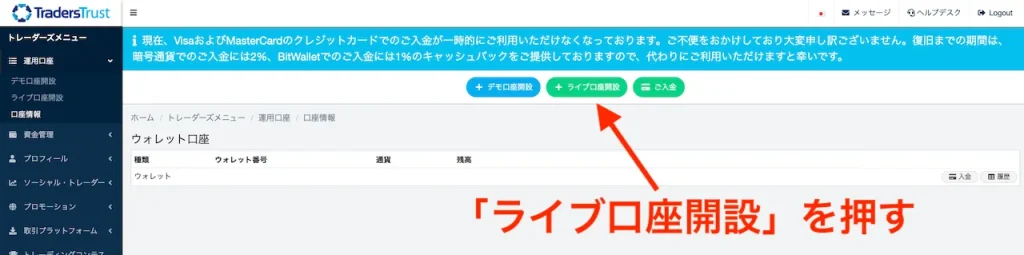
Once the review is complete and your account is active, create a cashback-eligible account. Click “+ Open a Live Account” at the top of the login page.
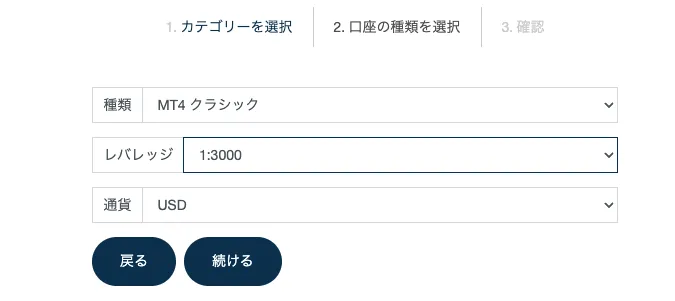
From the drop-down menu, select the Traders Trust (TTCM) cashback account type you want to create.

Select the leverage and currency you want to use, then click "Continue" to create the account.
That completes the process of opening a cashback account with Traders Trust (TTCM).
Let's apply for an account so you can get your cashback!
Once you've created an account eligible for cashback, the next step is to apply for an account to receive the cashback.
If you do not submit this application, you will not be able to receive your cashback even if you’ve gone to the trouble of opening a cashback-eligible account, so please be sure to do so.
Final Step >> Request a Cashback Receiving Account