This page provides instructions on how to open your first Trade View REBATE ONE cashback-eligible account.
Choose between the "Standard Account" and the "Low-Fee Account"
Trade View offers two types of accounts: the "Standard Account," where cashback balances are added to your REBATE ONE account, and the "Low-Fee Account," where the cashback amount is deducted in advance. Select the account type you prefer and create your account. Please note that if you use a low-fee account, since the cashback amount has already been deducted from your fees, your cashback history will not be reflected on your REBATE ONE My Page, and your balance will not be credited. We appreciate your understanding.
Depending on the type of account you're creating, the entry point to the account creation page will vary.
Documents Required for Opening a New Account with Trade View
Opening an account with Trade View does not require any mail-in paperwork; the entire process is completed online. To open an account, you will need an email address and the following identification documents.
Identification documents (valid)
* My Number Card
* Driver's License
* Passport
Proof of address (issued within the past 3 months)
* Certificate of Residence or equivalent official documentation
* Utility bills/receipts
Opening a Trade View Cashback Account
Click the link button to the official Trade View website to open the Trade View account opening page.
Enter the information
Unlike other brokers, Trade View’s account opening page does not include page transitions such as “Next”; it consists of a single page. The information required for both the “Standard” and “Low-Commission” account types is the same.
On the first "Start Your Application" page, enter your personal information—such as your name, email address, and cell phone number—using the Romanized alphabet and the drop-down menus.
Enter the phone number including the country code (for Japan, +81). If you are using a mobile phone registered in Japan, omit the leading "0" when entering the number.
Example: 090-△△△△-×××× → +8190-△△△△-××××

We'll move on to the next section. In this section, you'll select your U.S. citizenship status, occupation, and total assets. You simply need to choose the option that applies to you; there's no need to enter any information.
Questions regarding U.S. citizenship are asked to determine whether the individual has a tax obligation in the United States.

Continue scrolling down. Answer the questions regarding “Information on Sources of Income” and “Investment Experience.” Please note that for these questions as well, you simply need to select the options that apply to you; there is no need to enter any text.

Select “Annual Investment Amount” and “Purpose of the Account.” Please enter your “Annual Investment Amount” in U.S. dollars. For “Purpose of the Account,” please select the appropriate option.
Under “Account Management,” if you are opening the account to trade on your own, select “I will be the one trading.”
You do not need to enter the name of a referring broker or account representative. You also do not need to enter a “Promo code” if you click the “Open Account” button on REBATE ONE.
Uploading Required Documents
Select the type of document and the issuing country, then upload each one.
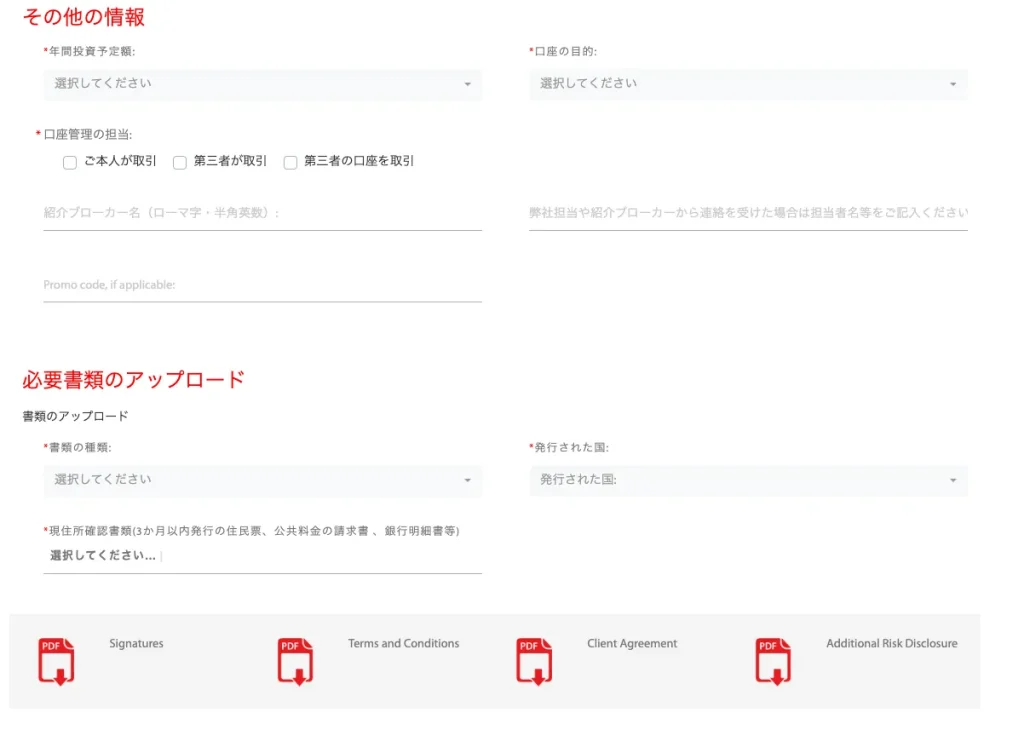
Finally, sign the form by hand in the signature field. You can also sign using a mouse or similar device. Once you have finished signing, check the box below and click “Submit.”

That completes the account opening process for Trade View.
Apply for an account so you can receive your cash back! (Standard type only)
Once you've created an account eligible for cashback, the next step is to apply for an account to receive the cashback.
(*If you are using a low-fee account, the cashback amount has already been deducted from your fees; therefore, it will not appear in your REBATE ONE account history or be added to your balance, so this step is not necessary.)
If you do not submit this application, you will not be able to receive your cashback even if you have gone to the trouble of opening a cashback-eligible account, so please be sure to do so.
Final Step >> Request a Cashback Receiving Account